Control
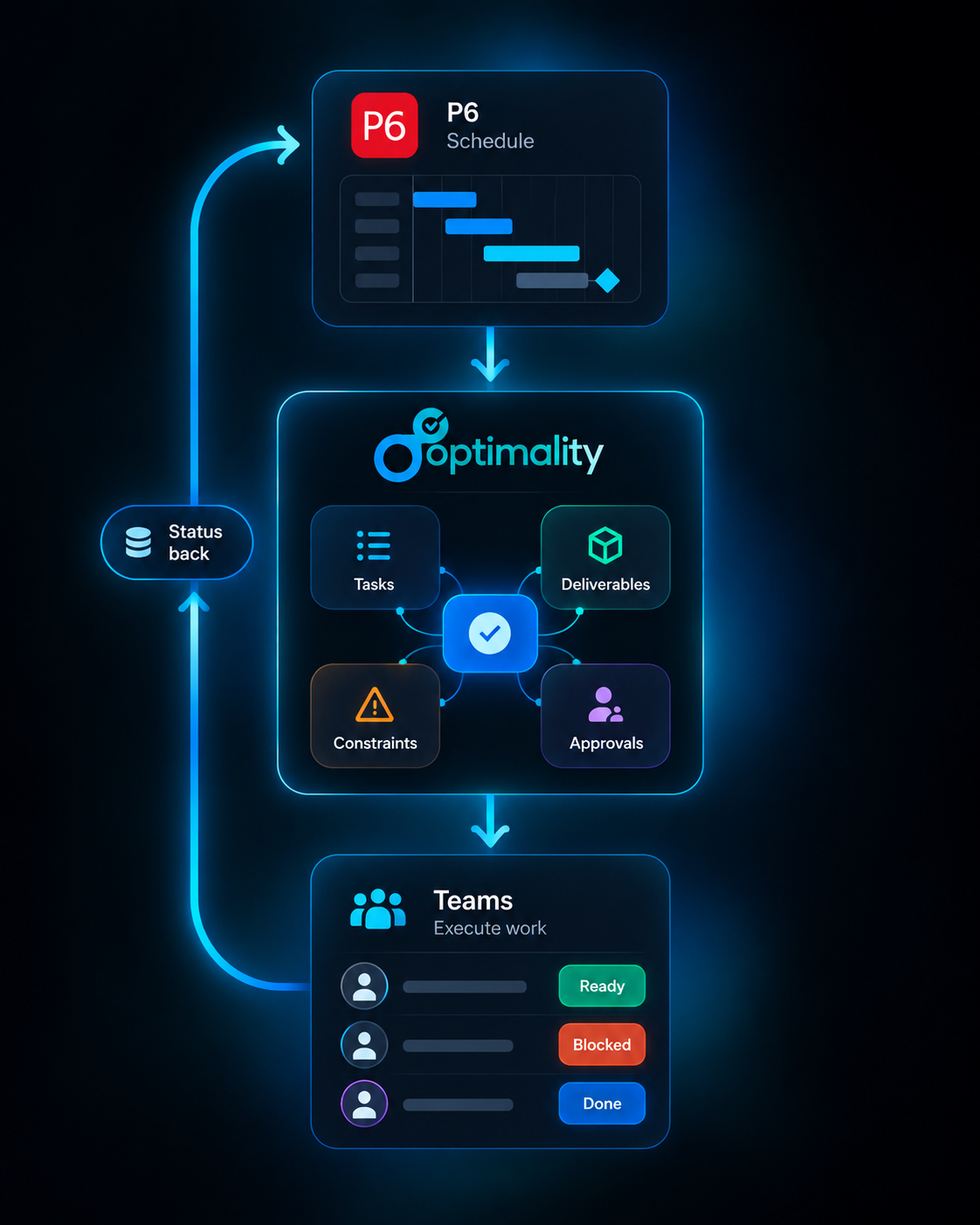
Maintain activities, logic, baselines and milestones in P6.

Primavera P6 / OPC + Optimality
Keep P6 or OPC as the source of truth for the schedule. Give project teams a practical way to plan, commit, execute and capture status at the source.
The gap beneath the schedule
Meeting notes
Approval logs
Lookahead plans
Emails
Constraint lists
Action trackers
A P6 activity can be exactly right for schedule control and still contain dozens of smaller steps, responsibilities and coordination points required to complete it.
When that detail lives across trackers, notes and inboxes, schedulers have to reconstruct progress after the fact.
One connected project-control loop
Each system stays focused on the job it does best.
Maintain activities, logic, baselines and milestones in P6.
Connect relevant activities to an execution-ready network.
Add deliverables, tasks, constraints, decisions and approvals.
Use Last Planner to agree what the team will accomplish.
Capture progress, context and evidence where work happens.
Give schedulers structured status to validate and return to P6.
One project, useful views for every role
See progress, forecast dates, constraints, deliverable status and reasons for variance, while schedule governance stays with the scheduler.
Teams do not need to understand CPM scheduling to know what is due, what is blocked and who needs something from them.
Status becomes an output of execution
Progress is stronger when it carries the reason, evidence and downstream consequence with it. Optimality keeps that context connected to the work that created it.
Field walk complete. Punch items attached for review.
Activity TA-4300 · 10:42Final energization is waiting on owner approval.
Linked to Milestone M-240 · 11:08Inspection package will be issued before 16:00.
Weekly work plan · 11:31Clear system boundaries
The governed control schedule

The connected execution environment
Traceable, reviewable information flows between the schedule and the people delivering the work.
Common questions
No. P6 remains authoritative for the control schedule. Optimality connects execution detail, commitments, constraints, deliverables and status around the relevant schedule activities.
No. Team members work through a practical execution view focused on their responsibilities, commitments, dependencies and approvals. Schedulers decide what status belongs in P6.
Teams can use the connected execution network for lookahead, make-ready and commitment planning. Should, can, will and did remain connected to the work and its schedule context.
Yes. They can break work into executable activities or attach the tasks, deliverables, constraints, decisions, reviews and acceptance criteria needed to perform it.
The scheduler retains schedule governance. Optimality provides structured execution information for review; it does not remove human control over the schedule.
See the loop in practice
Bring one P6 workflow, project or lookahead challenge. We will show how it can become a connected execution environment without creating a competing control schedule.